On this page
Withdrawal channels on in999
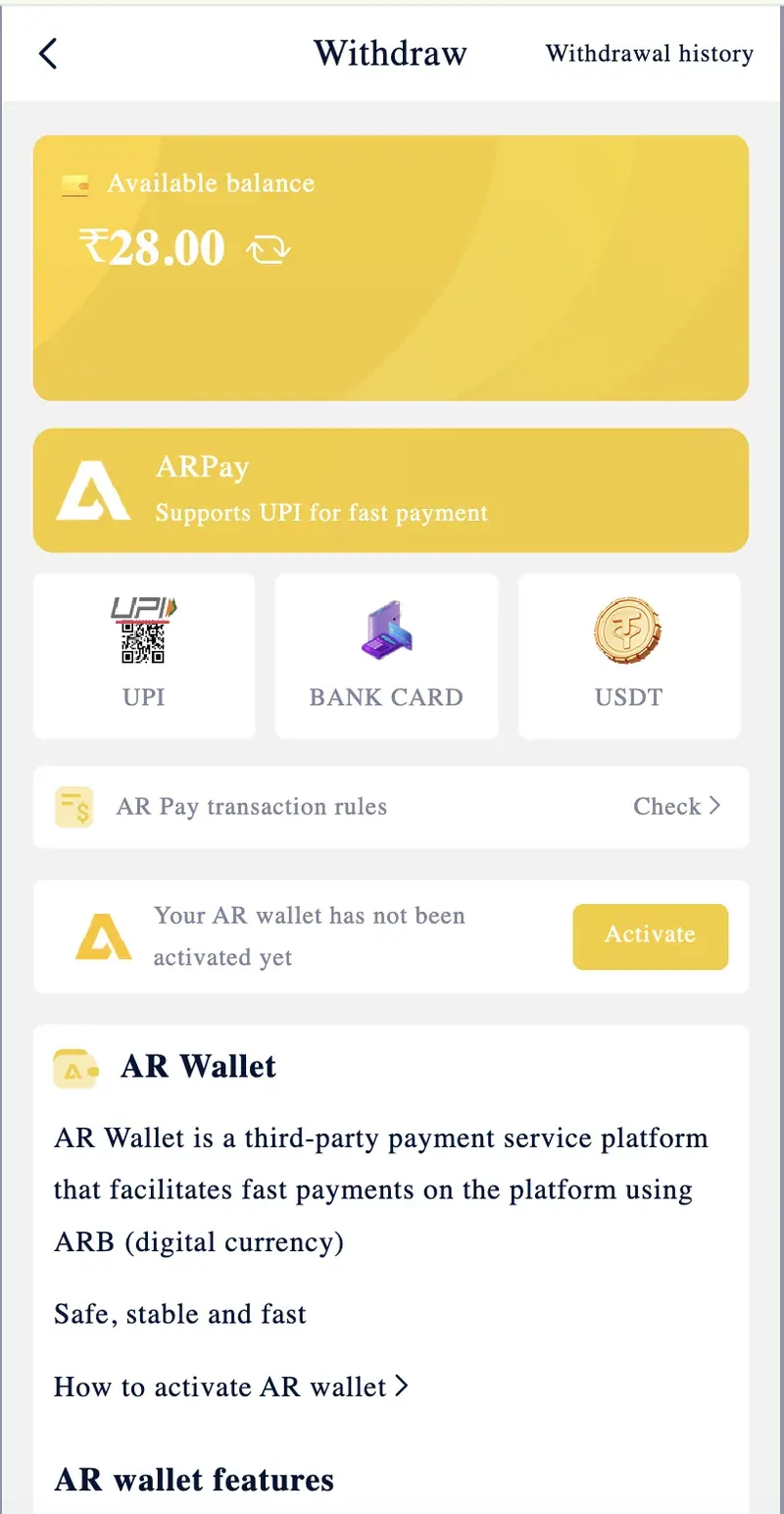
in999 supports three withdrawal channels. Each has a different minimum amount and processing characteristic.
UPI
Direct UPI transfer to your registered UPI ID. The most common withdrawal method.
Min: ₹110Bank Card
Direct bank account transfer via IFSC and account number. KYC-verified name must match.
Min: ₹110USDT (TRC-20)
Cryptocurrency withdrawal to your TRC-20 wallet. Requires 3 blockchain confirmations.
Min: ₹1,000The Withdrawal page also displays an ARPay tile for activating the AR Wallet, which is required for ARPay-based deposits. It is not a withdrawal channel — ARPay only supports deposits.
Minimum and maximum limits
| Channel | Minimum | Maximum per Transaction |
|---|---|---|
| UPI | ₹110 | ₹50,000 |
| Bank Card | ₹110 | ₹50,000 |
| USDT | ₹1,000 | ₹10,00,000 |
Daily limit
Users can make up to 3 withdrawals per day. The daily counter resets at midnight. The withdrawal window is 00:00 to 23:59, so users can withdraw at any time of day.
KYC requirements
KYC verification is required before the first withdrawal on in999. The verification ties your in999 account to your legal identity, which prevents fraud and ensures the withdrawal reaches the correct person.
What you need
- Aadhar card — clear front and back photos.
- Selfie holding the Aadhar card — face and document both clearly visible.
- Mobile number matching the account registration.
Where to submit
Open the in999 Self Service Center from the Account tab. Select the KYC option and upload the documents. Verification usually completes within a few hours. The name on the Aadhar must match the name on your in999 account and on your bank account.
How to bind UPI
UPI binding links your UPI ID (like yourname@paytm or yourname@ybl) to your in999 account. Once bound, the withdrawal is sent directly to this UPI ID.
Steps
- Open the Withdraw page from the Account tab.
- Tap the UPI tile.
- Enter your UPI ID in the format username@bank.
- Confirm the binding with an OTP if prompted.
- The UPI ID is now saved for future withdrawals.
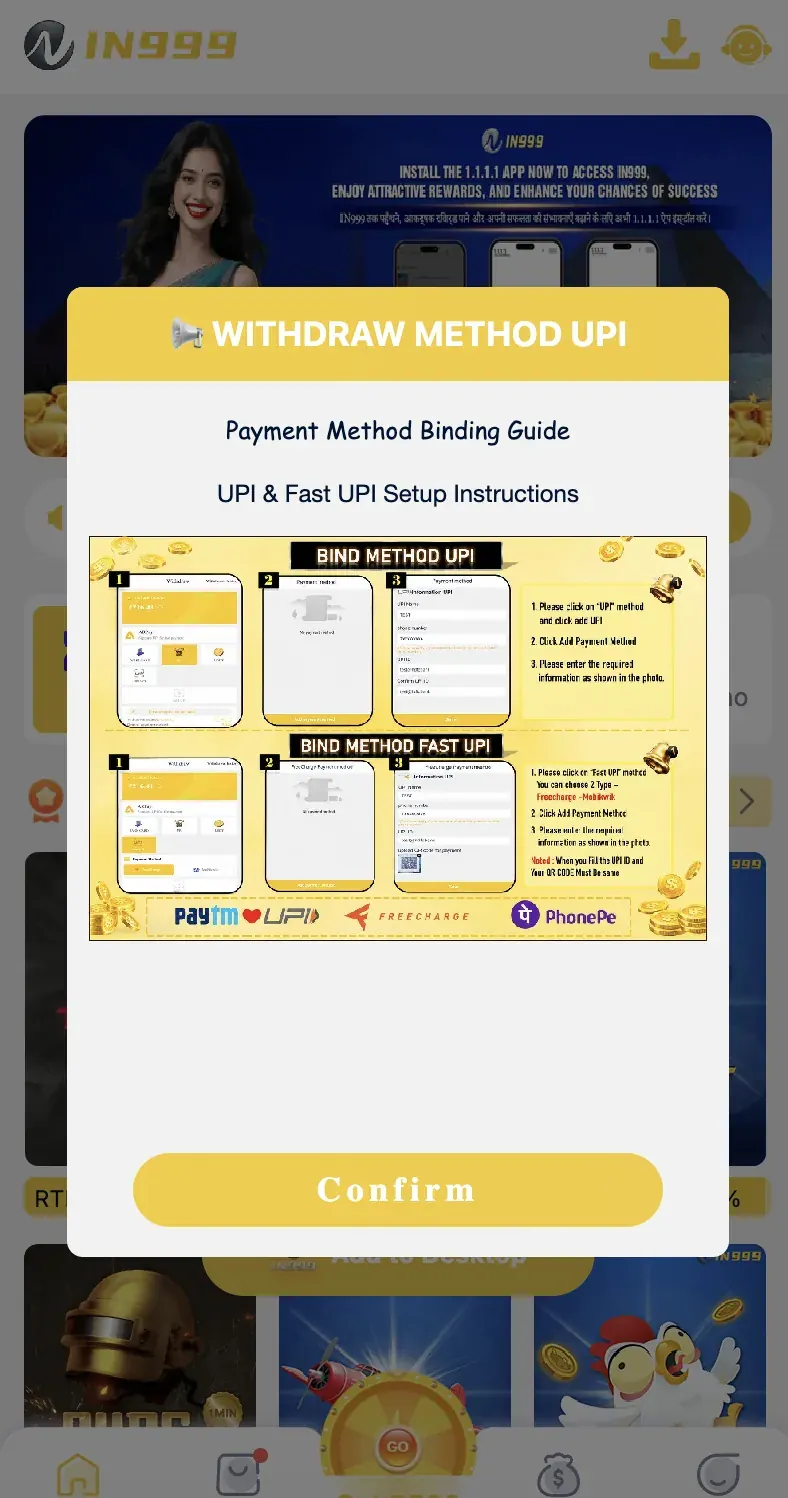
UPI binding guide from the app
The in999 app also displays a UPI binding guide with screenshots showing the exact fields. There are two methods: BIND METHOD UPI (for standard UPI IDs) and BIND METHOD FAST UPI (for Fast UPI IDs through Paytm, PhonePe, or Freecharge).
Rules for UPI binding
- Tap the UPI method and click Add.
- Click Add Payment Method.
- Enter the required information as shown in the app's guide.
- For Fast UPI, choose a type — Paytm, PhonePe, or Freecharge.
- For Fast UPI, the UPI ID and QR code must belong to the same account.
How to bind bank card
Bank card binding links your bank account number and IFSC code to your in999 account. Withdrawals sent to a bank card arrive in your bank account within the standard processing window.
Steps
- Open the Withdraw page.
- Tap the BANK CARD tile.
- Enter your account holder name, account number, and IFSC code.
- Confirm the binding.
- Verify the IFSC code is correct — wrong IFSC sends the money to the wrong bank.
IFSC modification
If you need to change the IFSC code later, use the Self Service Center's IFSC Modification option. To delete and rebind the entire bank account, use Delete Withdraw Bank Account and Rebind.
USDT withdrawal
USDT withdrawals use the TRC-20 network and support higher limits than UPI or bank card. The minimum is ₹1,000 (approximately 12 USDT), and the maximum per transaction is ₹10,00,000.
Steps
- Open the Withdraw page and tap USDT.
- Enter the amount in INR or USDT.
- Paste your TRC-20 wallet address.
- Confirm the withdrawal.
- Wait for 3 blockchain confirmations — usually 5–15 minutes.
Step-by-step withdrawal process
Complete KYC
Submit Aadhar and selfie through the Self Service Center. Wait for approval — usually a few hours. KYC is required only once.
Bind UPI or bank card
Open the Withdraw page. Bind your UPI ID or bank account. This is also required only once, but the UPI/bank can be changed later via the Self Service Center.
Meet the turnover requirement
If you have claimed a bonus, you must meet the 1x coding turnover before the winnings from that bonus become withdrawable. Check the Withdraw page for the exact amount you need to bet.
Open the Withdrawal page
From the Account tab, tap Withdraw. The page shows your withdrawable balance and the daily withdrawal count remaining.
Enter the amount and confirm
Enter at least ₹110 (or ₹1,000 for USDT). Tap the All button to withdraw the full balance. Confirm the withdrawal in the dialog that appears.
Receive funds
Withdrawals process within 30 minutes to 3 hours. USDT withdrawals require 3 blockchain confirmations. You will receive an in-app notification once the funds are sent.
Pending or failed withdrawal
KYC not completed
The most common reason. Complete KYC through the Self Service Center before attempting any withdrawal.
Wrong bank or UPI details
If the IFSC, account number, or UPI ID is incorrect, the transaction will fail. Verify the details in the binding settings before withdrawing.
Daily limit reached
Only 3 withdrawals are allowed per day. Wait for the counter to reset at midnight, or use a different withdrawal channel.
Turnover not met
If you have claimed a bonus, the withdrawal may be blocked until the 1x coding turnover is complete. The Withdraw page shows the exact amount you still need to bet.
Withdrawal amount below minimum
UPI and bank card require a minimum of ₹110. USDT requires a minimum of ₹1,000. Amounts below the minimum are rejected automatically.
Name mismatch
The name on the Aadhar must match the name on the bank account. If they differ, the bank will reject the transfer. Update the bank details or contact customer service.
Why bonus money cannot be withdrawn
Bonus funds on in999 are credited as gameplay balance, not as cash. They cannot be withdrawn directly. Only the winnings generated from playing with bonus funds are withdrawable — and only after meeting the platform's turnover requirement.
Turnover example
If you receive a ₹1,000 bonus that requires 1x coding turnover, you need to place bets totalling ₹1,000 before the winnings from that bonus become withdrawable. Once the turnover is met, winnings are added to your withdrawable balance.
Your original deposit (principal) is always withdrawable once the turnover on any claimed bonus is met. The bonus itself is never withdrawable as cash — it can only be used for gameplay.
Frequently asked questions
The minimum withdrawal on in999 is ₹110 for INR transactions and ₹1,000 for USDT withdrawals.
in999 withdrawals are processed within 30 minutes to 3 hours, subject to KYC verification and daily withdrawal limits.
Yes. KYC verification is required before the first withdrawal. Users must submit a clear Aadhar card photo and a selfie holding the document.
Users can withdraw up to 3 times per day on in999.
Withdrawals can be pending due to incomplete KYC, wrong bank details, exceeding the daily limit, or a turnover requirement not being met.
No. Bonus funds cannot be withdrawn directly. Only winnings from gameplay are withdrawable, after meeting the 1x coding turnover requirement.
Summary
Withdrawing from in999 requires three steps: KYC verification with Aadhar and selfie, binding UPI or bank card, and entering at least ₹110 (or ₹1,000 for USDT) on the Withdraw page. Withdrawals process within 30 minutes to 3 hours. The daily limit is 3 withdrawals. Bonus funds cannot be withdrawn directly — only winnings from gameplay, after meeting the 1x coding turnover requirement, are withdrawable.